
Automate Tech Debt Audits with Claude Code

Today I’m excited to share a new open source project: A Claude Code skill to assess technical debt in a Ruby on Rails application. It leverages some of the libraries that we have open sourced and maintained for a long time.
Over the years, we’ve written about many of the tools we use: Skunk for combining code quality and code coverage data, bundler-audit for security vulnerabilities in your dependencies, libyear-bundler for measuring dependency freshness in a Ruby application, and RubyCritic for churn vs. complexity analysis.
The challenge? Running all these tools manually takes time and interpreting the results across multiple reports can be tedious.
What if we could automate the entire audit process and generate a comprehensive report with a single command?
In this article, I’ll show you how we built a Claude Code skill that does exactly that, in minutes!
What is Claude Code?
Claude Code is Anthropic’s official CLI tool for Claude. It allows you to interact with Claude directly from your terminal, and it can read files, run commands, and make changes to your codebase.
One of its most powerful features is skills . Skills are reusable instructions that teach Claude how to perform specific tasks.
Skills are stored as markdown files in your project’s .claude/skills/ directory and can be invoked with slash commands
like /tech-debt-audit.
The Problem We’re Solving
When we onboard a new client project, we need to quickly assess the health of their Rails application. This means running multiple tools:
- Security:
bundler-audit, Brakeman,bundler-leak - Dependencies:
next_rails,libyear-bundler - Code Coverage: SimpleCov
- Churn vs. Complexity: RubyCritic
- Churn vs. Complexity vs. Code Coverage: Skunk
Each tool has its own installation requirements, command-line interface, and output format. A typical audit might involve:
gem install bundler-audit && bundle-audit check --update
gem install brakeman && brakeman --no-pager -q
gem install bundler-leak && bundle-leak check --update
gem install next_rails && bundle_report outdated
gem install libyear-bundler && libyear-bundler --all
COVERAGE=true bundle exec rspec
gem install rubycritic && rubycritic app lib --no-browser --format console
gem install skunk && skunk app lib
gem install rails_stats && rails-stats
That’s a lot of commands to remember and run. And then you need to interpret all the output and compile it into a coherent report.
Some of these steps are more involved than they look.
Getting fresh coverage data, for example, means re-running the whole test suite, and in CI that can also mean downloading and merging resultsets across parallel jobs before Skunk can read them.
The more the audit grows, the more time consuming it becomes.
The Solution: A Tech Debt Audit Skill
We created a Claude Code skill that automates this entire process. Here’s how you could set up your own:
Step 1: Create the Skill Directory
mkdir -p .claude/skills/tech-debt-audit
Step 2: Create the SKILL.md File
A skill is a single SKILL.md file at .claude/skills/tech-debt-audit/SKILL.md. It has two parts: a YAML front matter
block at the top that configures the skill, followed by the plain-English instructions Claude follows when you run it.
Here’s what a minimal frontmatter block looks like:
---
name: tech-debt-audit
description: Generate a comprehensive technical debt audit for a codebase.
allowed-tools:
  - Bash(gem install*)
  - Bash(bundle*)
  - Bash(brakeman*)
  - Bash(skunk*)
  - Bash(rubycritic*)
  - Bash(COVERAGE=true*)
  - Read
  - Glob
  - Grep
---
The three keys that matter:
name: the slash command used to invoke the skill (/tech-debt-audit)description: a one-line summary Claude uses to decide when the skill is relevantallowed-tools: the commands the skill is permitted to run without prompting, so the audit can install and run each tool unattended
Below the frontmatter code, the instructions tell Claude how to run the audit. There might be key insights you need to tell Claude. For example: You must run your test suite with coverage enabled before running Skunk.
Skunk reads SimpleCov’s coverage data from the coverage/ directory, so without
fresh data your SkunkScores will be inaccurate.
You don’t have to write all of this from scratch. The full SKILL.md, including the complete allowed-tools list and a
report template, is in the fastruby/tech-debt-skill repository.
Step 3: Run the Audit
Once the skill is set up, you can run it with:
claude /tech-debt-audit
Claude will automatically:
- Detect your project type (Ruby/Rails, JavaScript, or both)
- Install all required tools
- Run the test suite with coverage enabled
- Execute each audit tool
- Generate a comprehensive report
What the Report Looks Like
The skill produces a single, self-contained HTML report. The screenshots below come from running it against a sample Rails app.
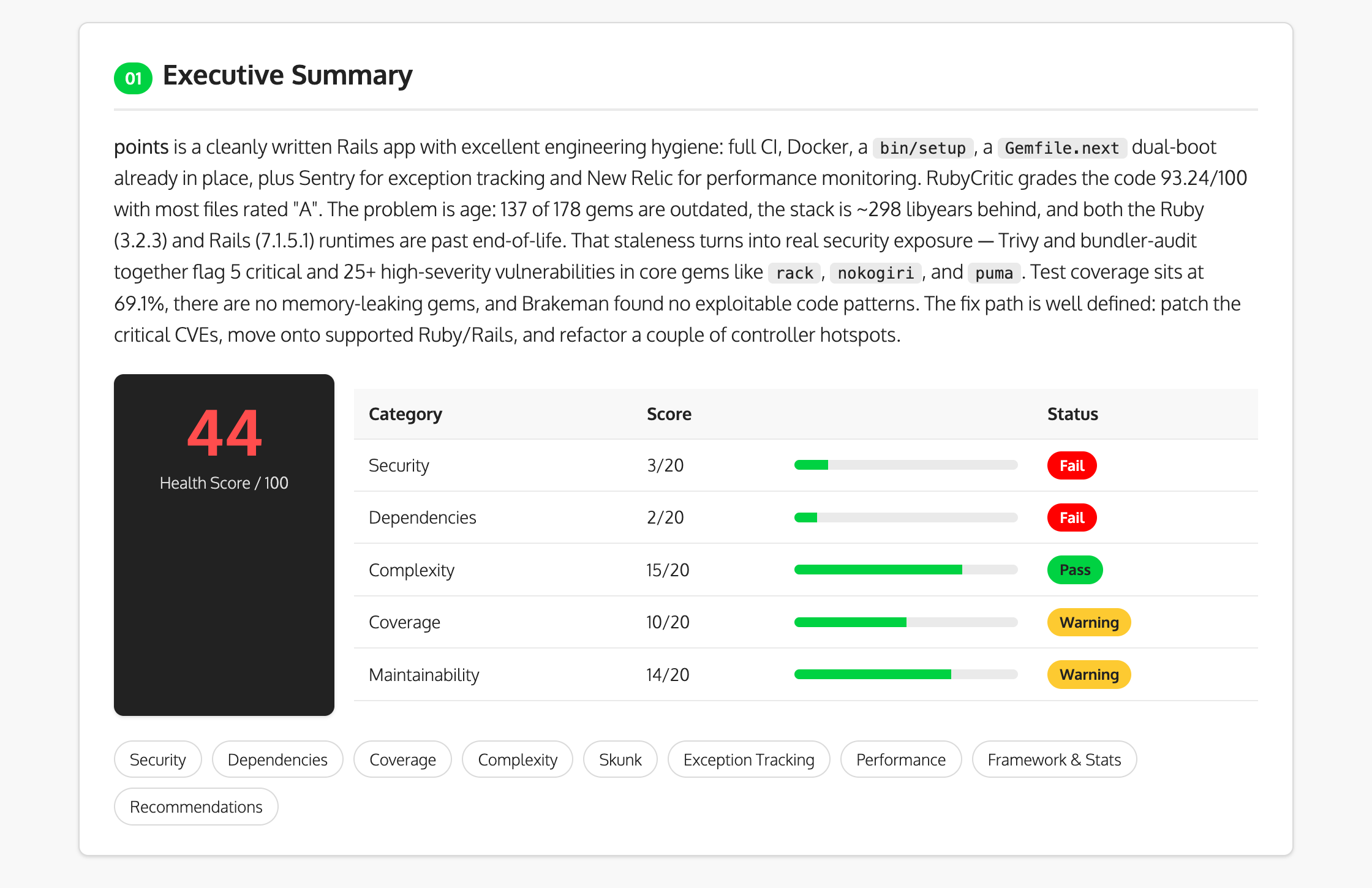
Executive Summary with Health Score
At the top, an executive summary rolls everything up into a single health score and a per-category breakdown:
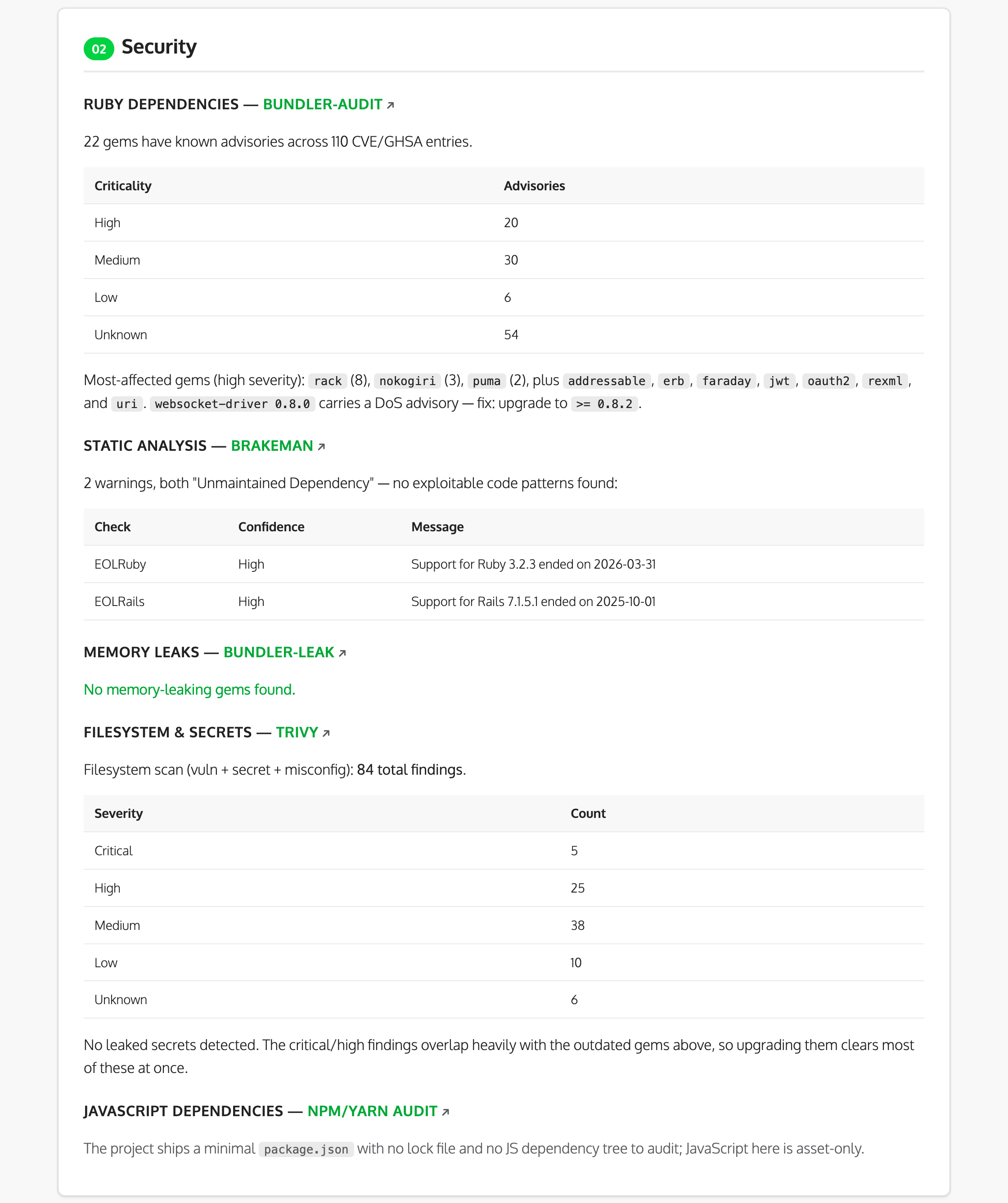
Security Vulnerabilities
The report lists known advisories from bundler-audit and Trivy , grouped by severity, alongside Brakeman’s static analysis
and bundler-leak’s memory-leak check:
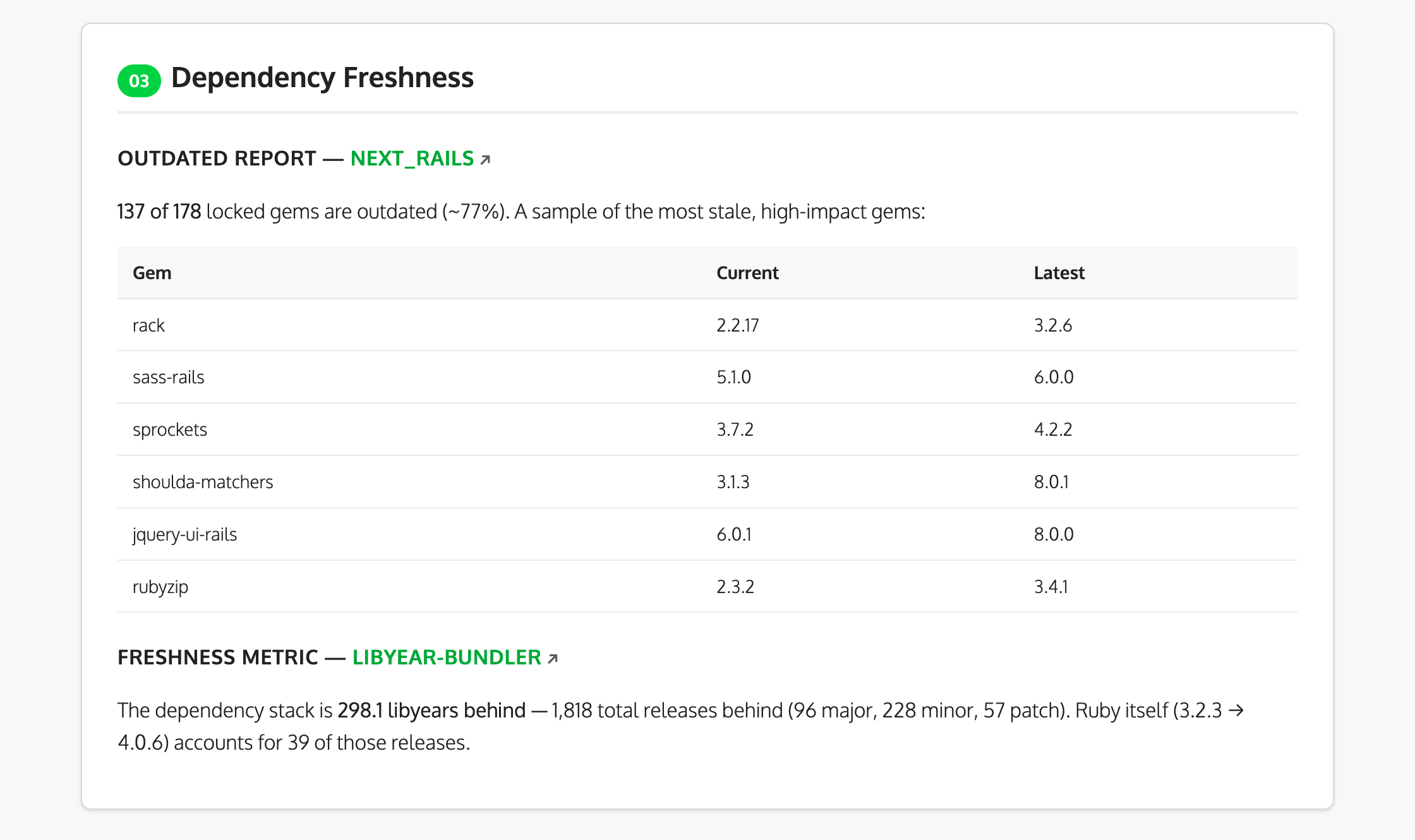
Dependency Freshness
It also reports how far behind your dependencies are, using next_rails for the outdated list and libyear-bundler for the
freshness metric:
Skunk Score Analysis
The Skunk analysis ranks files by churn-weighted risk, so the ones with high complexity and low coverage rise to the top:
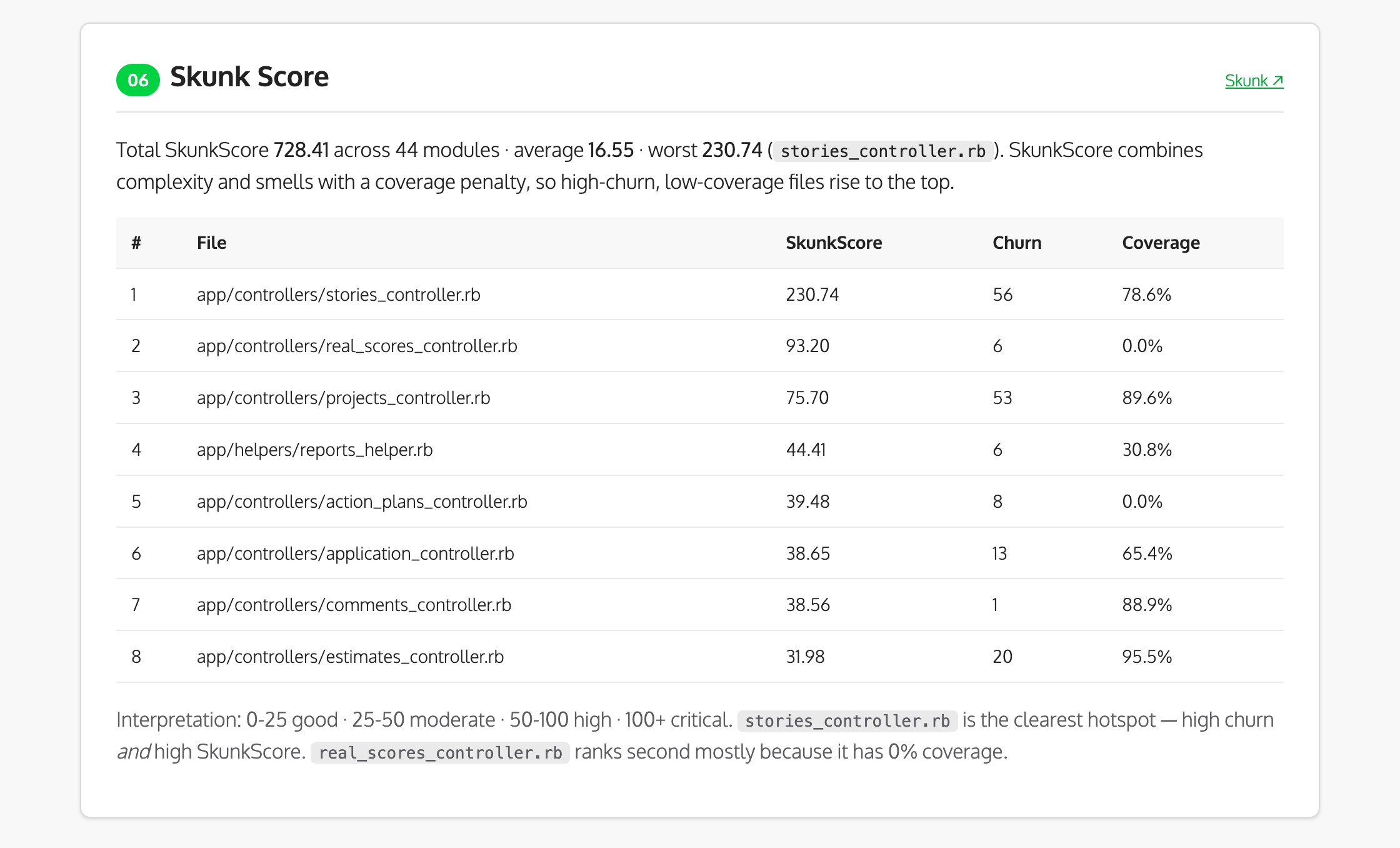
Files with high Skunk scores, high churn, and low coverage by your automated test suite are prime candidates for refactoring or adding tests.
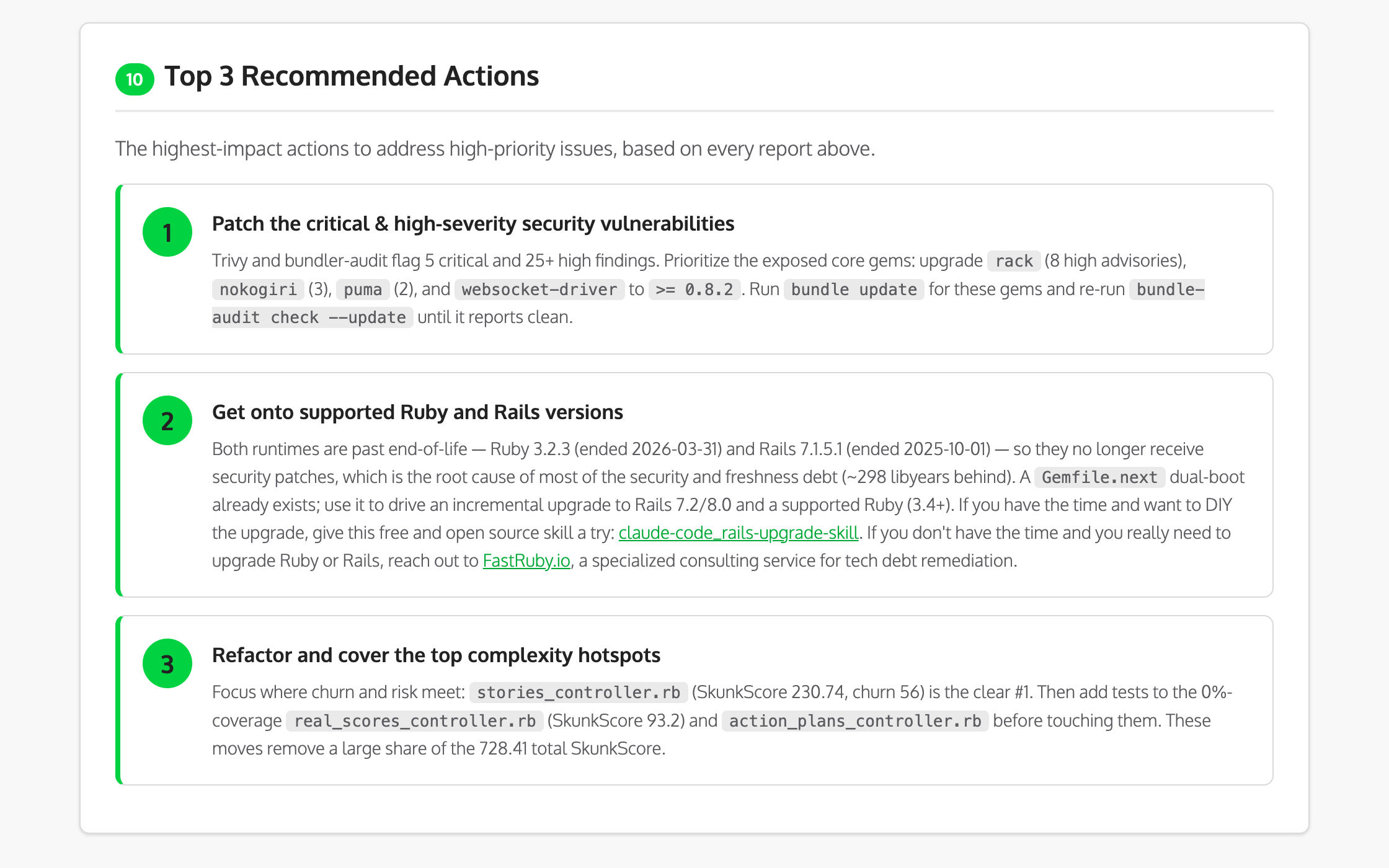
Prioritized Recommendations
Finally, the report distills everything above into a short list of the highest-impact actions:
Why Fresh Coverage Data Matters
During development of this skill, we discovered an important gotcha.
When we first ran Skunk, it reported that newsletter_service.rb had 0% coverage and a SkunkScore of 440.
But after running the test suite with COVERAGE=true bundle exec rspec, the same file showed 67% coverage and a SkunkScore of 145.
The difference?
Skunk reads coverage data from SimpleCov’s .resultset.json file. If that file is stale (or missing), Skunk assumes 0%
coverage and penalizes files heavily.
That’s why our skill always runs the test suite first:
# For RSpec projects
COVERAGE=true bundle exec rspec

# For Minitest projects
COVERAGE=true bundle exec rake test
Scoring Guidelines
The skill uses a 100-point scoring system across five categories:
Security (20 points)
- 20: No vulnerabilities
- 15: Low severity only
- 10: Some medium severity
- 5: High severity issues
- 0: Critical vulnerabilities
Dependencies (20 points)
- 20: <10% outdated, <5 libyears
- 15: <20% outdated, <15 libyears
- 10: <40% outdated, <30 libyears
- 5: <60% outdated, <50 libyears
- 0: >60% outdated or >50 libyears
Coverage (20 points)
- 20: >90% coverage
- 15: 70-90% coverage
- 10: 50-70% coverage
- 5: 30-50% coverage
- 0: <30% coverage
Complexity (20 points)
- 20: No files with complexity >10
- 15: Few files with complexity 11-20
- 10: Some files with complexity 21-50
- 5: Many files with high complexity
- 0: Files with complexity >50
Maintainability (20 points)
- 20: Excellent setup, CI, documentation
- 15: Good setup with minor gaps
- 10: Adequate but needs improvement
- 5: Significant maintainability issues
- 0: Major maintainability problems
Extending the Skill
The beauty of Claude Code skills is that they’re just markdown files. You can easily extend the skill to:
- Add JavaScript analysis with
npm auditand/orupjs-plato - Include performance metrics from your APM
- If you’re using Sentry, you could integrate this skill with Sentry’s MCP server .
- Check for EOL Ruby/Rails versions
- Integrate with your CI/CD pipeline
Final Thoughts
Technical debt is inevitable, but it doesn’t have to be invisible. Considering we are all using AI to generate a lot of the code that we ship to production, setting up proper guardrails for humans and robots is crucial.
By automating our tech debt audits with Claude Code, we can:
- Get a baseline: Know exactly where you stand before starting any upgrade or refactoring work
- Track progress: Run the audit regularly to see if your SkunkScore average is going up or down
- Prioritize effectively: Focus on files with high churn, high complexity, and low coverage
- Communicate clearly: Share the report with stakeholders to justify technical investments
The skill we built combines the power of tools like Skunk , bundler-audit , Brakeman , and RubyCritic into a single, automated workflow. No more running commands manually or piecing together reports from multiple sources.
Want to try it yourself? The skill is open source at fastruby/tech-debt-skill . Install it into any Rails project with:
mkdir -p .claude/skills
git clone https://github.com/fastruby/tech-debt-skill.git .claude/skills/tech-debt-audit
What tools or metrics would you like to include in your application’s tech debt audit? Send us a comment on social media or open an issue in GitHub !
Need help assessing and paying down technical debt in your Rails application? Contact us for a tech debt assessment!